bsaitz
Thanks, great detail!
Thanks, great detail!

I’m looking to install the high performance flat dish on my new yacht (Maritimo M60). I don’t work on the boat and I’m looking for something to stream my Roku in places that have cellular congestion.
I plan to put Roku on each TV. How far will the Star Link router reach?
1 reply
That’s a hard question to answer definitively. Boats aren’t like houses in that there are a lot more surfaces and materials that tend to mess with or block WiFi signals. It would depend on where the TVs are going to be located, and where the Starlink router is located.
Most boats around 60 feet or longer I have designed solutions for require two access points or WiFi routers for good coverage throughout the boat, especially further belowdecks.
Starlink does have a mesh product, which is essentially a second WiFi router that extends your range, but it is Starlink specific. I am not a big fan of using their equipment in general because of the lack of control and options. But it is an easy way to add more capacity.

So I’ve been experiencing an odd situation with my Starlink that I have connected via the ethernet adapter to my Pepwave MAX BR1 Pro 5G that I’m hoping someone here can help me sort out.
For reasons unknown I can’t surf too or ping Google.com, but I can ping 8.8.8.8. I can also both surf too and ping Yahoo.com. When I connect directly to my Starlink via the Starlink router I can access Google and do everything else as normal though. So my feeling is that there is something going on with my Pepwave but for the life of me I can’t figure out what that is.
If anyone has any ideas on this, or could help me troubleshoot it I would be eternally grateful. Thanks.
1 reply
So it’s just Google you can’t access? Any success since you posted this?

I have both the rectangular dish using the RV plan, and the flat high performance dish using the RV plan - I assume that’s what you were asking about?
Having both just means that I have some redundancy if one of the dishes has a hardware issue, or if by some chance, once is obstructed and the other isn’t (rare).
I wanted to know if you could have 2 Dishies on one account? I have the RV version now and just purchased the HP flat to replace it and just noticed your setup on your website having both. The cable for the HP is huge and difficult to get through my hard top area and was just thinking about keep my RV version that seems to work fine at Elliott Bay, but haven’t tried is underway or on anchor.
1 reply

Steve, thank you for the great article. I followed it and been able to setup SL + Peplink with no problem. I do still struggle with actually understanding the concept of ‘Management IP Address’. Specifically, why is it the 192.168.100.100 address that you put in. For this to work on my boat I had to put in 192.168.50.100. My default LAN is 192.168.50.1. Is yours on 192.168.100.1? But then that’s the dishy address. As you can see I’m confused.
Another thing I noticed is that if the SL is online but cannot connect, and the healthcheck fails, the SL app will not connect to the dishy through Peplink network. It will if I connect directly to SL wifi. It seems like Peplink is somehow blocking that connection when healthcheck fails. If I disable healthcheck, the SL app will connect fine through Peplink.
Best regards,
Maciek

Steve,
My kit came with a CAT6 RG45 terminated wire able to plug directly into the PoE, thereby eliminating the need and additional draw of the Starlink WiFi router and the Ethernet adapter.
I was able to get a connection (not perfect but workable) using a small Gb NetGear Switch between the HP antenna and the PepWave MAX-BR1-PRO-LTEA-W.
Static: IP of 192.168.100.99
Mask: 255.255.0.0
Gateway: 192.168.100.1
I have not tried your solution for the Health Check yet.
Have you tried this direct connection and if not, why?
Thanks,
Pierre
1 reply
Hi Pierre,
Which version dish do you have? The original circular one (which is what I suspect), the rectangular RV/residential one, or the more square-ish High Performance/Maritime version?
In the US, the RV/Residential and HP/Maritime versions require either the Starlink router, or the Starlink power supply in the case of the HP/Maritime version.
The older circular dishes came with a router, but the router-to-dish cabling was standard ethernet, and you could send PoE down it to power it. I have one of those dishes in use, but they aren’t as performant as the newer ones, and aren’t sold or shipped as often here in the US anymore.
Steve,
I have the (HP) High Performance newer antenna, hence my question.
Once I have a direct internet connection working properly with the POE, I intend to remove it and provide my own 24Vdc to 56Vdc POE and get my internet connection directly from there.
I have not checked the POE wiring of the Starlink POE adapter yet, I suspect that it will be the same Starlink specific wiring as the older versions.
Cheers,
Pierre
1 reply
Then I’m not sure I understand your question… Are you asking whether I’ve used the cable only version? Yes…
The Flat High Performance, at least in the US and Canada, requires that you use the provided Starlink power supply. It does come with an ethernet cable which you can use to connect it to a router, but you still need the Starlink power supply. You don’t need the router.
I did an overview of the Flat High Performance dish at Starlink flat high performance in-motion dish initial impressions
There are a number of folks who have figured out the pinouts to the dish and gone as far as trying to provide PoE power without the Starlink power supply, but at 320W of total power, that’s going to be a pretty specialized or at least industrial version of a supply - different than the hacks that a lot of folks have done for the smaller dishes.
The same management IP address that I cover in this article can be used for the round dish. That’s the only special thing to consider. With my particular hardware setup, I used the provided Starlink power supply that was sending PoE to the dish, and no switch in between. Some older Peplink hardware does perform better with a switch in between due to a hardware incompatibility.
Posting again in hope of an answer
Steve, thank you for the great article. I followed it and have been able to set up SL + Peplink with no problem. I do still struggle with actually understanding the concept of ‘Management IP Address’. Specifically, why is it the 192.168.100.100 address that you put in. For this to work on my boat, I had to put in 192.168.50.100. My default LAN is 192.168.50.1. Is yours on 192.168.100.1? But then that’s the dishy address. As you can see, I’m confused.
Another thing I noticed is that if the SL is online but cannot connect, and the health check fails, the SL app will not connect to the dishy through the Peplink network. It will if I connect directly to SL wifi. It seems like Peplink is somehow blocking that connection when healthcheck fails. If I disable healthcheck, the SL app will connect fine through Peplink.
Best regards,
Maciek

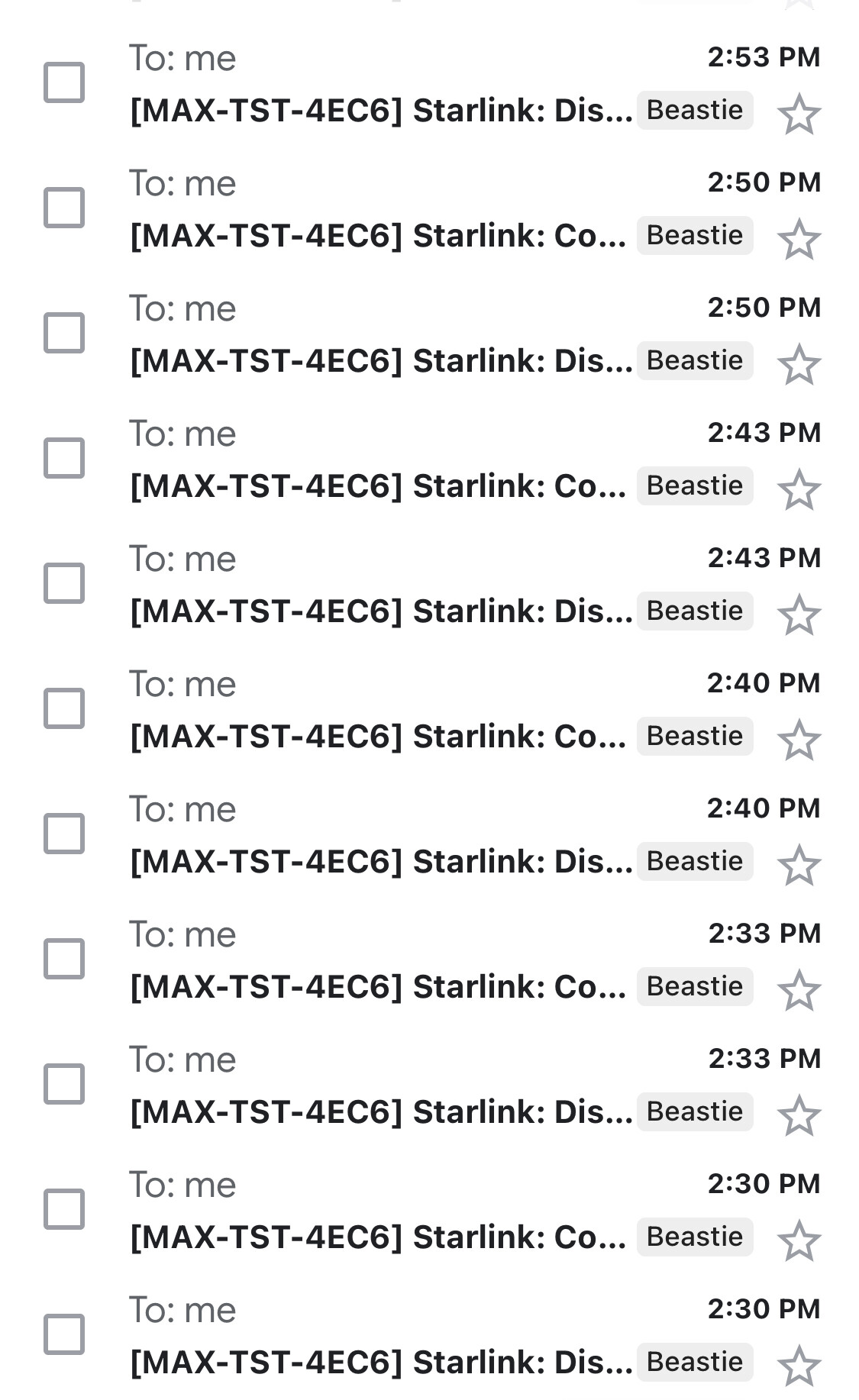
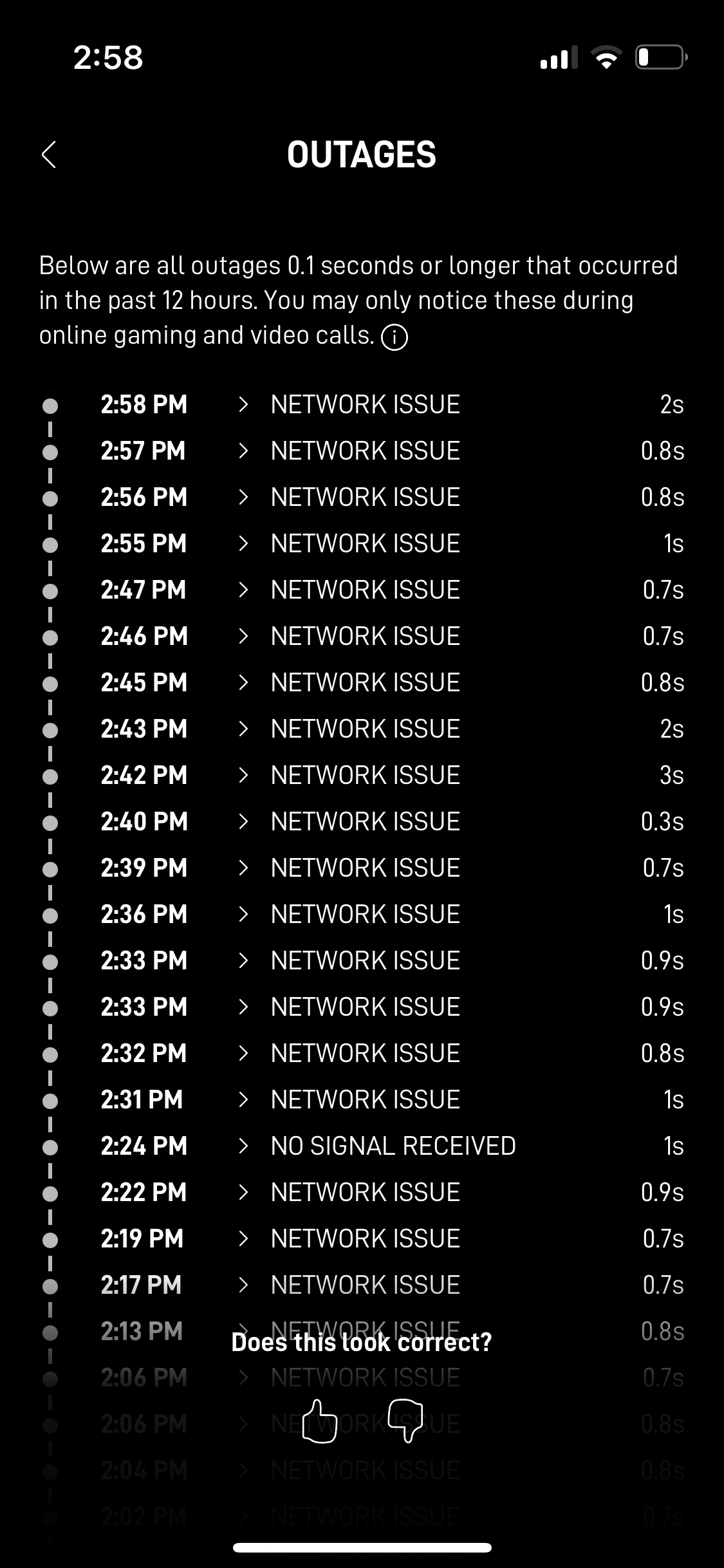
Great article. I used very similar health check settings but I’m struggling with the configuration. Peplink continuously sends me disconnect warnings although the Starlink connection is very solid with no obstructions. This leads to instability in my speed fusion setup because peplink each time tries to do a hot failover. The Starlink app does report very frequent issues of the satellite not connecting to the internet but each one of these outages rarely lasts more than a second.

Hi Steve,
Would you have any updates to these recommendations when using the Bypass function with the RV/Roam systems? As the SL router is altogether Physically bypassed, is there suggested changes to protocol?
Also, an anecdotal question- Having recently commissioned a RV high performance with a BR1Pro 5G I experience anticipated performance in stock setup through SL router but, when bypassed the speed drops to a crawl (and there is a warning of “Poor Cable Connection”). If the router is reverted to factory settings, performance increases 10-fold.
Is this an isolated case, or a known phenomenon?
Best regards,
Brian
The 192.168.100.0 networking range is the Starlink router uses to communicate between itself and the Peplink. 192.168.100.1 is the IP address of the Starlink router itself and is how the app you have on your phone communicates with it.
By setting a management address of 192.168.100.100 on the Peplink, that allows the Peplink to route the traffic from the Starlink app on your phone so you can manage it.
Sounds like you might have other configuration or network issues. The health checks and management setting is something I’ve used on hundreds of setups without issues.
That seems like you might have some sort of issue with the dish, or an obstruction. Looks like you’re getting an interruption every minute. Really the only way to get 100% reliable connectivity if you can’t fix that part is to have both your Starlink and cellular connections at priority 1 so they are both being used at the same time.
That way the cellular connection will cover the outages from Starlink, but you’ll have slightly better results with the lower latency Starlink connection when it’s up.
The downside is that it will use a lot of bandwidth on your cellular plan which might run you up against an overall cap of some sorts.
1 reply
I think I cover some of the bypass bits in the article. In general, there’s not much you have to do other than add a management address.
If you’re seeing poor cable connection, you likely actually have a bad cable connection, or something funky with the WAN port on the router. I’ve seen this a few times, once with one of my Starlink setups, and it actually turned out to be a bad ethernet cable/ethernet adapter on the Starlink side.
There are performance challenges with older Peplink products that cut performance down much lower when cabled versus when using WiFi as WAN, but the BR1 Pro 5G is not one of them. This sounds like some other sort of issue.
Ah! You must have one of the hardware platforms that I noted in my article that points to this forum post: Peplink | Pepwave - Forum
The super-old ethernet chipsets they were using caused issues that couldn’t be resolved without a switch in between. Not the best solution, but Peplink isn’t a huge vendor that Starlink really cares about, so getting them to change something was not going to happen. It also appeared to affect a number of other products out there using similar or identical ethernet chipsets.

Steve, appreciate the article… read it the first time when it came out, and again today… since I have my Max Transit Duo Pro configured and running with multiple cellular, and the refurb Gen3 SL is inbound. So the obvious question: any updates/changes/advice for the Gen3 SL?
I’m on Residential to start, but will switch to RV after tested and running. And setup fusion (finally). And 12VDC power.
Any thoughts, relative to your article given the Gen3 ?
Thanks, David.
Hi David,
I’ve not found anything so far that would require a different setup or configuration with Peplink and the gen3 dish. Everything in the article seems to still apply. Of course, if you want to use things underway, the High Performance dish still continues to be the best choice, but the residential/RV dishes work as well as long as you don’t go too fast.

I also have questions about the Standard Gen3 set up for use with my Peplink MAX BR1 Mini.
The new Standard dish has ethernet ports. Does that eliminate the need for an Adapter for use with the Peplink router? If so, is the Starlink cable, router and power supply still required? Does the non-actuated dish still require power?
If you are going to use the gen3 without an aftermarket power supply or other kit, you’ll need to retain the Starlink router and connect it either via Ethernet or WiFi as WAN. If you don’t want the WiFi network to be broadcast from the Starlink router, and want your Peplink to do that instead (which is the usual choice), you can put the Starlink router in bypass mode which I believe I cover in the article that is connected to this forum post.